четвъртък, 11 юни 2009 г.

понеделник, 1 юни 2009 г.
Google Wave
Убиеца на P2P, e-mail, jabber, icq, aol, msn IM, html и IRC?
Ето и една добре представена презентация, която хвърля малко светлина по въпроса:
Ето и една добре представена презентация, която хвърля малко светлина по въпроса:
Довиждане Java?
Както никой не можеше да се съмнява, Oracle започнаха да внасят своя "принос" към новия JDK: Java SE for Business is a new product subscription model designed to more than double Sun's support periods for releases, provide faster access to technology updates and offer enterprise deployment features for customers using Java SE technology.
With the announcement of Java SE for Business customers and partners running Java applications on older release families (1.4, 5.0, 6) now have a choice of either migrating to a newer release or subscribing to Java SE for Business to continue receiving critical reliability, availability and security updates, as well as new operating environment support for their existing applications.
Скоро се появи и новия ъпдейт 1.6_14 със нов гарбидж колектор G1, с малката "подромност": Although G1 is available for use in this release, note that production use of G1 is only permitted where a Java support contract has been purchased. G1 is supported thru Sun's Java Platform Standard Edition for Business program.
Какви познати думи: Бла бла фор бизнесес, бла бла съпорт, бла бла ентърпрайз, бла бла ънаунсмънт, бла бла мигрейтинг, събскрипшън, пърчизинг... (както казва народа - шит хепънс еври дей :) )
Да се надяваме, че зад подобни думи (които могат да се намерят във всяка Oracle технология) не се крие само поредния "акуизишън" и нищо повече. Дано Sun-ския JDK не последва съдбата на Оракълския JDK 1.4 (не се разработва и поддържа от години).
With the announcement of Java SE for Business customers and partners running Java applications on older release families (1.4, 5.0, 6) now have a choice of either migrating to a newer release or subscribing to Java SE for Business to continue receiving critical reliability, availability and security updates, as well as new operating environment support for their existing applications.
Скоро се появи и новия ъпдейт 1.6_14 със нов гарбидж колектор G1, с малката "подромност": Although G1 is available for use in this release, note that production use of G1 is only permitted where a Java support contract has been purchased. G1 is supported thru Sun's Java Platform Standard Edition for Business program.
Какви познати думи: Бла бла фор бизнесес, бла бла съпорт, бла бла ентърпрайз, бла бла ънаунсмънт, бла бла мигрейтинг, събскрипшън, пърчизинг... (както казва народа - шит хепънс еври дей :) )
Да се надяваме, че зад подобни думи (които могат да се намерят във всяка Oracle технология) не се крие само поредния "акуизишън" и нищо повече. Дано Sun-ския JDK не последва съдбата на Оракълския JDK 1.4 (не се разработва и поддържа от години).
петък, 15 май 2009 г.
Debug Java applets with Eclipse
Debugging applets by System.out.println("Blah14") is not the best practice in case we have IDE-s like Eclipse:)
As we know, with Eclipse we can debug remote applications like java apps deployed on some container or application server.
You can debug applets in same manner:
1. Enable remote debugging in the Java Plugin:
- Start/Settings/Control Panel/Java/Java Applet Runtime Settings/View
- Add the following to the "Java Runtime Parameters": -Djava.compiler=NONE -Xnoagent -Xdebug -Xrunjdwp:transport=dt_socket,address=127.0.0.19000,server=y,suspend=n
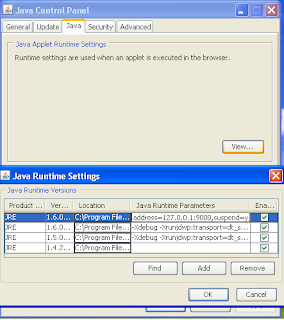
2. Close all Web browser Windows
3. Put breakpoints in your source code (you need to have an Eclipse project containing the applet source code)
4. In Eclipse create a remote debugging configuration:
- Run/Open Debug Dialog/Remote Java Application/New
- Assign host = localhost and port = 9000 //or other
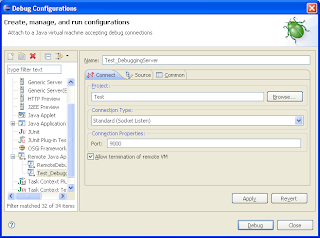
5. Open the page that contains the applet.
6. Press the "Debug" button in Eclipse and be happy.
Useful resources:
http://www.nakov.com/blog/2008/08/20/debugging-java-applets-in-eclipse/
http://webmoli.com/2009/01/17/debugging-applet-code-using-eclipse/
http://www.ibm.com/developerworks/java/library/os-eclipse-javadebug/index.html?ca=drs-
As we know, with Eclipse we can debug remote applications like java apps deployed on some container or application server.
You can debug applets in same manner:
1. Enable remote debugging in the Java Plugin:
- Start/Settings/Control Panel/Java/Java Applet Runtime Settings/View
- Add the following to the "Java Runtime Parameters": -Djava.compiler=NONE -Xnoagent -Xdebug -Xrunjdwp:transport=dt_socket,address=127.0.0.19000,server=y,suspend=n

2. Close all Web browser Windows
3. Put breakpoints in your source code (you need to have an Eclipse project containing the applet source code)
4. In Eclipse create a remote debugging configuration:
- Run/Open Debug Dialog/Remote Java Application/New
- Assign host = localhost and port = 9000 //or other

5. Open the page that contains the applet.
6. Press the "Debug" button in Eclipse and be happy.
Useful resources:
http://www.nakov.com/blog/2008/08/20/debugging-java-applets-in-eclipse/
http://webmoli.com/2009/01/17/debugging-applet-code-using-eclipse/
http://www.ibm.com/developerworks/java/library/os-eclipse-javadebug/index.html?ca=drs-
събота, 9 май 2009 г.
петък, 8 май 2009 г.

сряда, 15 април 2009 г.
I'm Linux
Ето и някои от победителите в конкурса за рекламно кличе на Linux, организиран от Linux Foundation, в края на 2008-а.
Този не е от конкурса но е интересен :)
Този не е от конкурса но е интересен :)
Абонамент за:
Коментари (Atom)